












































What’s New in Sapaad: October 2017
 Sapaad Content Team
We’ve introduced an array of enhancements to improve your experience with Sapaad and your customers’ experience with your business.
In case you missed it, here are a few highlights from our October updates.
An all-improved POS experience – Faster, smarter, better order-taking

We’ve updated Sapaad’s order-taking experience for improved usability, readability, responsiveness, and performance! Find out more.
Enhanced Total Sales Report
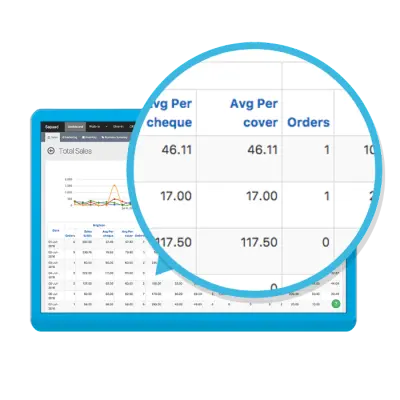
We’ve introduced new data — ‘Avg Per cover’ — when viewing Dine-In orders in the Total Sales Report. Now instantly get visibility into the average sales per Dine-In customer at your restaurant. Compare average per cover sales over time, discover sales trends and make informed business decisions.
Text alignment in Invoice Templates
When customizing an Invoice Template with a header or footer, you can now specify text alignment with the new alignment buttons on the content editor toolbar.
General Updates
a. When adding a new staff or editing an existing one, the ‘Assign To’ dropdown now displays all locations irrespective of type, be it Sales, Stock, or Sales and Stock.
b. When creating a Staff Role or editing an existing one under Setup > Staff, it is now mandatory to select at least one Access Right & Permission for the role. This gracefully prevents error-ing out when users with that staff role log in to Sapaad.
c. Customer Notes in CRM can now be deleted.
d. We’ve disabled the ability to edit the Measurement Unit and Purchasing Details fields when editing an already created Ingredient or Finished Good. This will eliminate human error and prevent discrepancies.
e. When updating the cost per unit while receiving a Purchase Order or Stock Receipt, the Supplier Price remains unchanged.
f. An Ingredient or Finished Good, if part of a consignment or Stock Take in progress, for e.g. a Purchase Order in transit or a Stock Take under review or unreconciled, cannot be deleted.
g. When exporting reports, we’ve improved the ‘export’ behavior so that duplicate reports are not inadvertently exported.
h. When applying a value discount to an order, if the discount value is greater than the total amount of the order, Sapaad detects and disallows it.
i. For improved menu performance, when uploading an image for your menu items, Sapaad now gracefully warns you if your image size is larger than 1 MB.
j. The POS screen, in particular, the discount panel for orders and items, are now fully cached, resulting in a large performance boost and resource saving. The POS, in general, should load 10-15% faster.
k. The Business Summary on your dashboard has now been optimized for performance boosts and resource saving.
l. The Menu Setup screen has also been optimized for improved performance.
We’ve got more exciting stuff coming and can’t wait to share it!
Be sure to keep checking back our blog, and follow us on Facebook and Twitter.
Not using Sapaad yet?
Sapaad Content Team
Author

Related Blog Posts

















Get the latest news and updates
Submit your email address to join our email list.